
🎮 Tatkal Software Demo — Live Demo Center
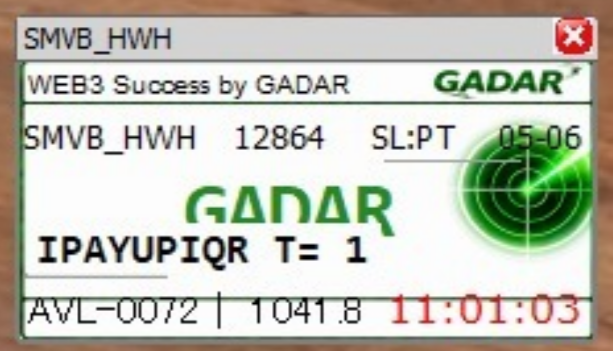
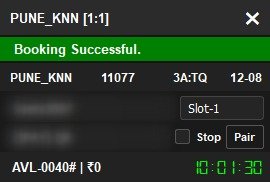
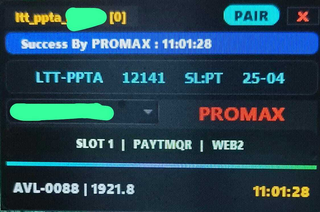
🎁 FREE Tatkal Software Demo — Pehle Try Karo, Phir Buy Karo! TatkalSoftware.in par selected Tatkal booking software ke free demo options available hain, jisse aap purchase se pehle software ka interface, features aur booking workflow dekh sakte hain. Gadar, PromaX, Star TS, Xtreme, Alexa, Terminal, Orbit aur other available software ke demo options check karein. 🆓 FREE Demo: Jahan FREE badge diya gaya hai, wahan available demo bina demo fee ke try kiya ja sakta hai. 💳 Paid Trial: Kuch software ke 2-day trial/demo options paid ho sakte hain. Har product ka current price aur demo type card par clearly diya gaya hai. 📱 Demo help ke liye WhatsApp ya Telegram support se contact karein. Hamari team software selection, demo access aur basic setup mein help karti hai. 👉 Pehle demo dekho → features compare karo → phir apna plan choose karo.
1. AnyDesk 2. UltraViewer 3. TeamViewer
💡 Ya upar diye software card se Get Demo dabakar instant demo le lo (har software ka rate card par likha hai).
💡 Live demo charges ke liye WhatsApp / Live Chat par poochhein. Payment ke baad Reference Number aur AnyDesk ID share karein.
💻 How to Install on PC / Laptop
Step 1: Install .NET Framework 4.5.2 or newer. (Windows 7 / 8.1 / 10 / 11 par mostly pre-installed hota hai.) Hamari official website se download karein aur install instructions follow karein.
Step 2: Download link se software file download karein.
Step 3: WinRAR se Desktop par extract karein.
Step 4: Software open karein.
Step 5: Software ready! Sirf 45–55 second me ticket booking enjoy karein.
🎫 How to Book IRCTC Tatkal Tickets
Step 1: Tatkal software run karein.
Step 2: 'ID' tab par click karke apna IRCTC User ID & Password add karein, phir Save karein. (Software me auto-save ho jata hai.)
Step 3: 'Bank' tab par jaakar payment option chunein (Net Banking / Debit / Credit / Wallet), details sahi se bharein aur save karein.
Step 4: Step 1 & 2 ke baad Ticket tab par click karein → New Ticket (naya) ya Edit Ticket (saved).
Step 5: Ant me Ticket tab me Open Ticket par click karke Tatkal booking karein.
Trained, in-house experts are here to help 24/7. Our robust help center includes guides, video tutorials and more.
Try us and love us, or get a refund within 1 day. You're never locked into a contract — no hidden fees or gimmicks.
You need your service now, not tomorrow. Upon purchase, your Tatkal Software is activated instantly!
Need help? WhatsApp our award-winning 24/7 support team — experienced help via e-mail and live chat.
Free Tatkal Software Demo — Try Before You Buy (2026)
TatkalSoftware.in par aap IRCTC Tatkal booking software ka demo le sakte ho khareedne se pehle — FREE demo (instant license) ya paid demo (nominal charge — har software ke card par price likhi hai), dono available. Auto captcha fill, all-bank smart OTP handling, auto UPI payment, 2 PNR booking ek saath, master-list auto-fill — saare powerful features apni aankhon se test karo. Demo bilkul genuine software ka trial hai jo 2/3/5 din valid rehta hai.
Pasand aaye to ek click me full 30-day license le lo. SpaceX, TeslaX, Starlink, Gadar, PromaX, Alexa samait 12+ Tatkal software — sabka demo + full version available. thousands of agents ka bharosa. Confused ho to hamari team AnyDesk par LIVE demo bhi dikha sakti hai — WhatsApp par contact karo. 🚄
❓ Demo — Frequently Asked Questions
Kya Tatkal software ka FREE demo milta hai?
Demo kitne din ke liye valid hota hai?
Demo aur full version me kya farak hai?
Paid demo kitne ka hota hai?
Demo lene ke liye kya chahiye?
Demo key kahan milegi?
Demo ke baad full version kaise lein?
Demo software safe aur genuine hai?
🚀 Setup mein help chahiye? 24/7 Support available hai!
🔥 Exclusive updates, instant support & special offers ke liye channel join kare!
🤔 Tatkal Software Demo Kaise Milega? Get Demo page par available software cards dekhein. Jis software ke card par FREE likha hai, uska free demo option available hai. Paid trial wale software ke liye card par displayed price applicable hoga. Demo access ke liye required details submit karein aur instructions follow karein. Agar kisi software ka demo available nahi hai, to latest availability ke liye support team se contact karein. ⚠️ Demo availability, duration, price aur supported features software ke according different ho sakte hain. Purchase se pehle respective product page par latest details check karein.
💳 Scan & Pay
🎉 Congratulations!
Aapka order place ho gaya — successfully! 🎊
✅ Admin payment verify karte hi aapki license key seedhe Dashboard → My Software me aa jayegi — aur WhatsApp par bhi bhej denge.
WhatsApp pe Confirm Karo 📋 My Orders dekho →